
Good
One word that names what people get: guide, price, checklist, demo. +1 works for quick sign-ups when the caption says what it sends.
What a follower sees from comment to tap, how Replier matches keywords, and the limits Meta sets.
Instagram comment-to-DM automation sends a private message to someone who comments a keyword on your post. In Replier, you pick the post, set the keyword and save the DM; Replier sends it when a matching comment arrives.
One automation on one post, with the keyword guide. The same flow works on a Reel and on a Facebook Page post.
The post says what to comment and what arrives: “Comment guide and I’ll DM you the checklist.” Put the same word on the image or in the Reel too, for people who never open the caption.
Meta passes the comment to Replier. Replier answers it only if the automation is on, the post is one the automation targets, and the comment contains one of its keywords.
With public replies turned on, Replier answers the comment in the thread, for example “Sent you a DM.” You can save up to 5 versions and choose whether Replier picks one at random or sends them in order, so the thread doesn’t repeat one line.
The follower gets the DM you saved, with up to 3 buttons. On Instagram, a DM to someone who doesn’t follow you lands in their message requests instead of the main inbox, so the public reply is a good place to mention it.
The button opens your page through a Replier tracking link, so the tap is counted. In the automation’s Recent activity, the interaction shows DM sent and, after the tap, its total clicks. The Automations list keeps a Clicks (all time) column.
The step-by-step setup guide shows every screen. In short:
Click Connect Instagram for an Instagram professional account, or Connect Facebook for a Facebook Page.
Pick a post on Choose posts to automate, or target your Next post or All posts, then click Next: write replies.
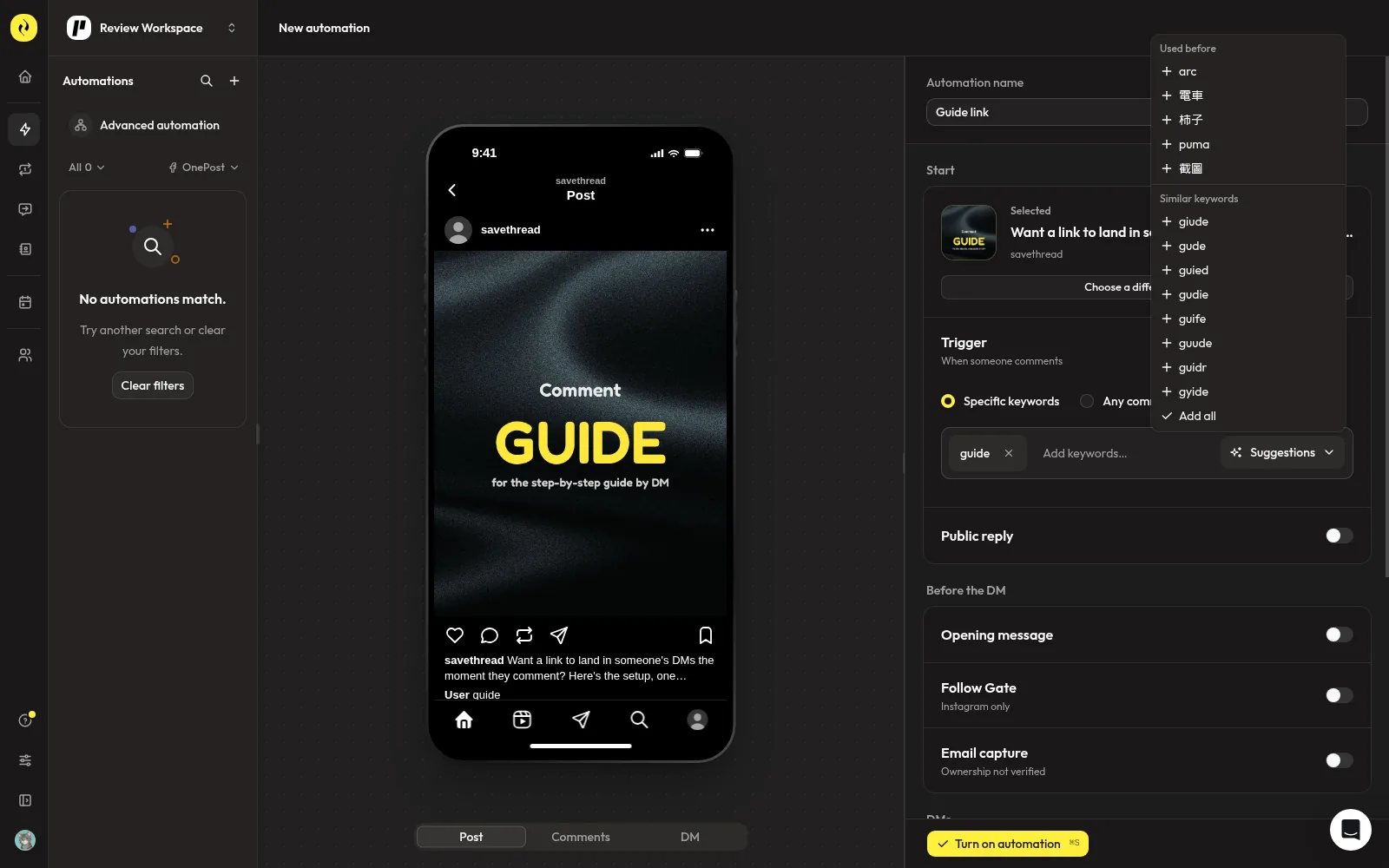
Under When someone comments, choose Specific keywords and type guide, or choose Any comment to answer every comment on those posts.
Under DM content, write the message and use Add button for the link. Turn on Public reply if you want the thread reply, then click Turn on automation.
Replier checks whether the comment contains one of your keywords. Capital letters don’t matter, so GUIDE, Guide and “can I get the guide?” all match guide. The keyword box says so too: “Capital letters and full-width characters match too.” Text typed in full-width form counts as the normal form, so GUIDE matches guide and +1 matches +1, and an emoji keyword such as ❤️ also matches ❤.
Because it looks for the keyword anywhere in the text, a keyword also matches inside longer words: guide matches guidebook, and info matches information. It doesn’t fix spelling or spacing, so giude doesn’t match guide, and free-guide or freeguide doesn’t match free guide.
One automation can hold several keywords, and a comment that contains any of them matches. Choose Any comment instead when every comment should get the DM.
One word that names what people get: guide, price, checklist, demo. +1 works for quick sign-ups when the caption says what it sends.
Short keywords match inside common words: info matches information, and art matches start and party.
Words people type when they only react, such as wow, nice or love, send the DM to people who never asked.
If one caption asks for guide, price and demo, say which word sends what, or use one automation per keyword.
Typos and spacing need their own keywords: add giude next to guide, or both free guide and freeguide. After you type a keyword, click Suggest similar keywords. Replier proposes up to 12 other spellings of the same word, such as spacing and hyphen versions, common typos and the word in the other Chinese script, and skips any your keywords already match. Click one to add it, or Add all.
Comment the keyword from a second account. Replier never answers the connected account’s own comments, so a test from your own account shows nothing. Until the first interaction arrives, Recent activity shows the hint: Test from another account using “guide”.
Check three things: the public reply appears, the DM arrives (look in message requests if the test account doesn’t follow you), and the button opens the right page.
These come from Meta’s private replies rules for Instagram and Facebook Pages, and apply to every comment-to-DM tool:
No. Any comment that contains the keyword matches, so “guide please 🙏” and “GUIDE!” both get the DM.
Yes. Connect a Facebook Page and set up the automation the same way. The one-reply and 7-day rules apply there too.
Meta allows a private reply up to 7 days after a comment. Replier’s Catch up page can send the DM to eligible comments from that window; older comments can only get a public reply.
The most common causes are commenting from the connected account itself, a keyword the comment doesn’t contain, or a post the automation doesn’t target. The troubleshooting page has the full checklist.